
- In a 2016 study of 3,500 distributor customers, about 74% ordered by email frequently or very frequently, and many distributors still key those orders by hand.
- Reading the PDF is the easy part. The hard part is matching customer part numbers, units and contract prices to your ERP.
- Keep a person in the loop: the agent drafts orders and a rep approves the exceptions.
- Start with one inbox or your top customers, and measure minutes per order before and after.
- Only 15% of distributors have a proven AI use case in daily operations (DSG, 2026), and order entry is a good first one because its payback is easy to measure.
Your customer service reps aren't typists, but many of them spend the day retyping purchase orders. In a 2016 study of more than 3,500 distributor customers, about 74% said they order by email frequently or very frequently (Distribution Strategy Group, 2016). Ten years later, the same research firm still describes order entry as a back-office bottleneck, with wholesalers keying orders from email, PDFs and spreadsheets into the ERP by hand (DSG, 2026). This guide shows how to automate that work without losing control of what goes into your ERP.
Why order entry is still manual at most distributors
Your customers send purchase orders in their own formats. One sends a PDF from their ERP, another pastes lines into an email, and a third attaches a spreadsheet. A contractor sends a phone photo of a handwritten list.
None of them use your part numbers. They use their own codes, a manufacturer number, or a description like "1/2 in. copper elbow." They order in their units, such as cases, while you stock in eaches. A rep has to translate every line and retype it into the ERP.
That work is slow and error-prone. Every keying mistake turns into a wrong shipment, a return or a credit memo. The same inbox also fills with "where is my order?" emails, which pull reps away from new orders.
Distributors know this. In 2026 research by Distribution Strategy Group, 93% of wholesale distribution executives called AI a strategic priority, and in its study of more than 300 North American distributors, only 26 met its bar for integrated, production-level AI (DSG, 2026). Manufacturers show the same gap: 72% have adopted AI, but only 10% at scale (Parsec, survey of 1,200 manufacturing leaders, July 2026).
of distributors have moved a proven AI use case into daily operations.
Distribution Strategy Group, 2026. Most projects stall between pilot and daily use.A narrow workflow with one inbox and one measurable outcome is how you get past that stall.
How an AI order entry agent works, step by step
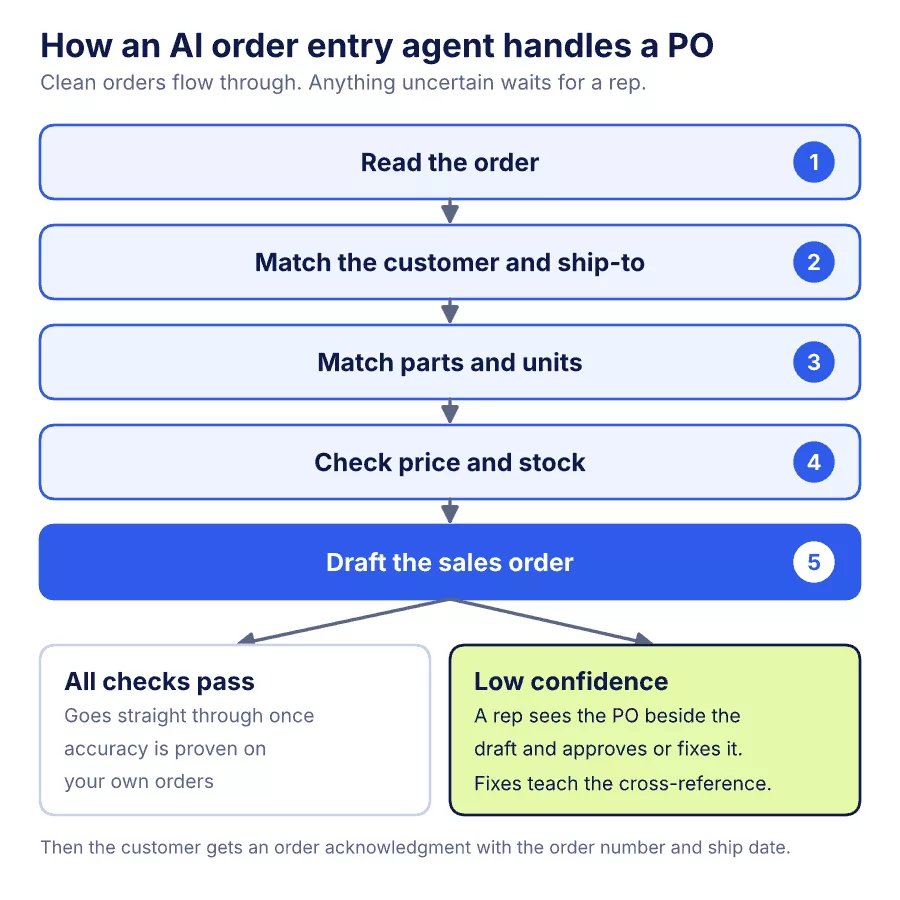
- IntakeThe agent connects to your shared orders mailbox in Microsoft 365 or Google Workspace. It sorts each message into a new order, a change to an order, a status question or a quote request.
- ExtractionIt pulls the header (customer, PO number, ship-to, requested date) and every line (customer part number, description, quantity, unit, price). It handles email bodies, PDFs, Excel and CSV files. Scans and photos go through text recognition first.
- Customer and ship-to matchIt finds the account and ship-to address in your ERP. A new or ambiguous ship-to gets flagged rather than guessed.
- Item matchIt looks up the customer's part number in your cross-reference table. When there's no entry, it searches by manufacturer part number and description and suggests the closest items with a confidence score.
- Units and priceIt converts the customer's unit to your stocking unit, then compares the PO price with the customer's contract or list price. Mismatches get flagged.
- AvailabilityIt checks stock at the shipping branch and notes backorders.
- Draft orderIt creates the sales order in the ERP through its API, on hold or marked for review.
- ReviewA rep sees the original PO beside the draft, with low-confidence fields highlighted, and approves or corrects it. Each correction updates the cross-reference table, so the same line matches automatically next time.
- ConfirmationThe agent sends the customer an order acknowledgment with the order number and expected ship date.
Over time you can let orders that pass every check go straight through, and route only exceptions to a person.
What has to be right
The ERP connection. The agent has to write orders into your ERP, not just read PDFs. How it connects depends on the system:
| How the agent connects | Check before you start | |
|---|---|---|
| Epicor Prophet 21 | Prophet 21 exposes a REST API, an Entity API, an Interactive API and an OData data services API (Supergood, independent integration reference). | Which APIs your version, hosting and license include. Availability varies by deployment and licensing. |
| Epicor Eclipse | The Eclipse API exposes REST endpoints. Creating, updating and searching sales orders is in the Sales Order API, a premium bundle (Epicor). | Whether your license includes the Sales Order API bundle. |
| NetSuite | SuiteTalk REST web services, using the salesorder record and its salesOrderItem lines (Oracle). | Tax setup. REST doesn't support legacy tax features and needs SuiteTax enabled. |
Cross-reference data. Most matching errors come from missing customer part numbers. Export your existing cross-references and your top customers' order history before the build. The agent learns new matches as reps approve them.
Units of measure. List every unit conversion your catalog uses, such as each, box, case, foot and coil. A wrong conversion ships ten times too much or too little.
Contract pricing. Decide what happens when the PO price differs from your price. Common options are flagging it for a rep, accepting it within a set tolerance, or always using your system price.
Confidence rules. Set the thresholds that decide which orders a person must see. Start strict, with every order reviewed, and loosen as accuracy proves out on your own data.
Audit trail. Keep the original email, the extracted data, the draft and the rep's changes for every order. You'll need them for disputes and for tuning.
Where to start: a pilot that proves payback
- Pick one scopeChoose one orders inbox, one branch, or your top 20 customers by order count.
- Measure a baseline for two weeksTrack orders per day, minutes per order, lines per order, keying errors, and time from email to acknowledgment.
- Run in shadow modeThe agent drafts every order while reps keep keying as usual. Compare the drafts with what the reps entered.
- Switch to review modeReps stop keying and approve or correct drafts instead.
- Compare against the baselineDo this after 30 days.
The payback math is simple. Here's an illustrative example, not a client result. If a team keys 120 orders a day at 6 minutes each, that's 12 hours of rep time a day. If review takes 1.5 minutes per order instead, the team gets about 9 hours a day back for quotes, follow-ups and customer calls. At the $25.51 mean hourly wage for customer service reps at durable-goods wholesalers (BLS, May 2025), that time is worth about $230 a day, or roughly $5,050 a month over 22 working days, before benefits. Rerun it with your own numbers in our order entry cost breakdown.
What it costs
Softpers builds AI agents on a fixed price. Projects start from $3k and begin with a 1–2 week fixed-price pilot, so you see a first working version on your own orders before committing. Most agents go live in 2–8 weeks, with a 30-day warranty after launch, and you own the code (Softpers AI Agents). The full cost lines, including per-order AI usage, ERP API licensing and data cleanup, are in our order entry cost breakdown.
What drives the build price up:
- More ERPs, or more systems to write into (ERP plus CRM plus e-commerce)
- Many distinct PO layouts, or a lot of scanned and handwritten orders
- Thin or messy cross-reference data that needs cleanup first
- Extra steps such as credit checks, freight quotes or drop-ship routing
Weighing off-the-shelf order automation software instead? See order automation software vs a custom AI agent.
The natural next step: order status
Once orders flow in automatically, the same inbox still gets "where is my order?" emails. An order status agent reads the question, finds the order in the ERP, adds the carrier tracking, and drafts the reply. A rep can approve it, or it can send on its own. It reuses the inbox connection and ERP integration you already built. Here's how to automate "where is my order?" emails.
Is order entry automation right for you? 30 seconds
FAQs
How accurate is AI order extraction?
It depends on your PO formats and the quality of your cross-reference data, so measure it on your own orders. Shadow mode gives you that number before anyone stops keying. Keep a person reviewing anything below your confidence threshold.
Can it handle scanned, faxed or handwritten orders?
Yes, after text recognition. Accuracy is lower than on digital PDFs, so these orders usually stay in the review queue longer.
Does this replace our customer service reps?
No. It removes the retyping. Reps review exceptions, handle new customers and spend more time on quotes and calls.
Which ERPs does it work with?
Any ERP with a usable API. Epicor Prophet 21, Epicor Eclipse and NetSuite are common in industrial distribution. Confirm your API licensing first.
How long until it's live?
You see a first working version in 1 to 2 weeks, during the fixed-price pilot. A single-inbox agent typically goes live in 2 to 8 weeks, depending on how many systems it connects to.
- The Electronic Postman Always Rings Much More Than Twice (Distribution Strategy Group, 2016)
- The two-quarter window: why European distribution leaders have to move on AI now (Distribution Strategy Group, 2026)
- Parsec Survey: 72% of Manufacturers Have Adopted AI, but Only 10% Have Done So at Scale (Parsec, July 2026)
- Epicor Eclipse API (Epicor)
- Sales Order, REST web services record reference (Oracle NetSuite)
- Prophet 21 (Epicor) API (Supergood, independent integration reference)
- Occupational Employment and Wage Statistics: Merchant Wholesalers, Durable Goods, May 2025 (U.S. Bureau of Labor Statistics, 2026)
- AI Agents service (Softpers)

Haider AbbasSoftware Engineer of Softpers
Full-Stack Software Developer with 5+ years of experience building scalable web applications using Laravel, React.js, Next.js, Node.js, Python, and Django. Passionate about problem-solving, clean architecture, AI-powered solutions, and delivering high-quality software that drives business value.